> For the complete documentation index, see [llms.txt](https://ace-counter.gitbook.io/guide/llms.txt). Markdown versions of documentation pages are available by appending `.md` to page URLs; this page is available as [Markdown](https://ace-counter.gitbook.io/guide/behavior-and-conversion/internal-event.md).
# 내부 이벤트 분석 설정
에이스카운터에서는 배너 링크에 설정한 코드를 적용하는 간단한 방법으로 해당 배너를 통한 페이지뷰와 구매/전환 성과까지 쉽게 분석해 볼 수 있습니다
### 1. 내부 이벤트 설정하기
{% stepper %}
{% step %}
#### 내부이벤트 설정 열기
\[설정 > 콘텐츠 > 내부 이벤트] 메뉴를 클릭합니다.
{% endstep %}
{% step %}
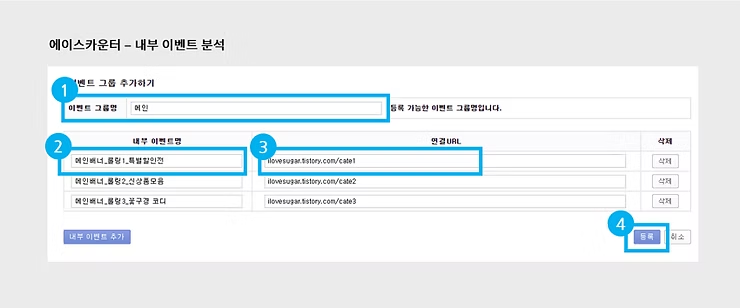
#### 이벤트 이름 설정하기
* 분석에 사용할 그룹명과 영역 별 각 이벤트 명을 입력합니다.
* 배너 클릭 시 연결될 페이지 URL을 입력하고 등록 버튼을 클릭하면 설정이 완료됩니다
{% endstep %}
{% step %}
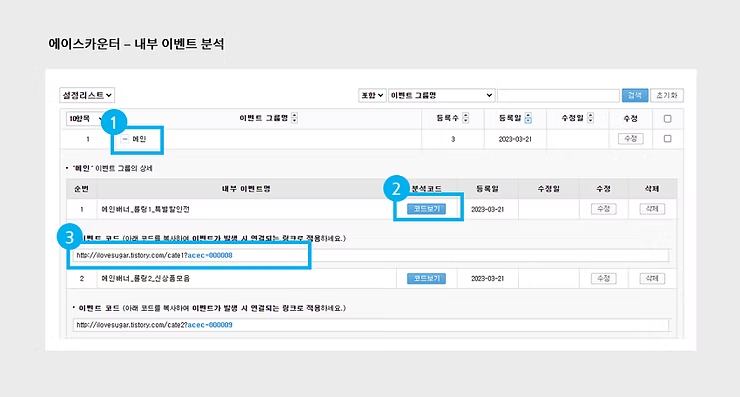
#### 코드 복사하기
설정 리스트에서 + 버튼을 클릭하고 코드보기 버튼을 클릭합니다.
코드가 적용된 URL을 복사하여 사이트 배너의 링크를 교체하면 설정이완료됩니다.
{% endstep %}
{% endstepper %}
{% hint style="info" %}
외부 유입(광고·마케팅)과 사이트 내부 이동(팝업·배너 등)은 측정 방식이 다릅니다. 사이트 내부 콘텐츠를 측정할 경우에는 내부 이벤트 전용 코드를 사용해 주세요.
{% endhint %}
### 2. 내부 이벤트 분석 리포트
리포트
설명
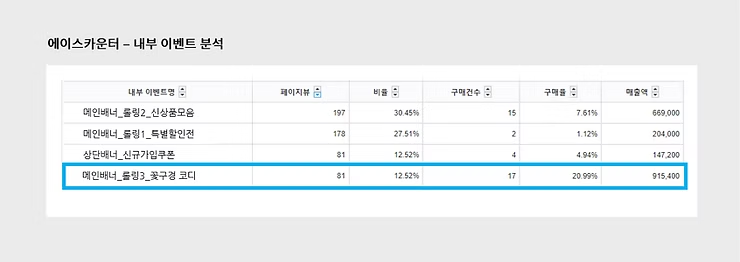
[콘텐츠> 내부 이벤트]
사이트내에서버튼이나 링크로 이동한 페이지에서 발생한 이벤트의 효과분석을 위한 리포트입니다. 페이지뷰 기반으로 측정합니다.